


Curb - Request & Pay for Taxis
3.03.88K Reviews
App Specs
- Version
- 7.1.3
- Updated On
- License
- Free
- Downloads
- 1,000,000+
- Developer
- Curb Mobility, LLC
- Categories
- Maps & Navigation
- Platform
- Android, iOS
Screenshots
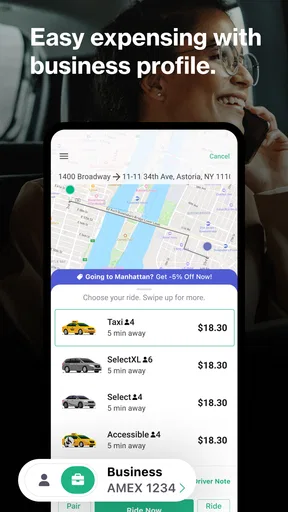
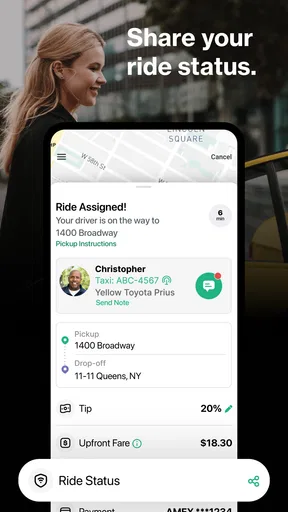
 Analysis by AppCompare
When I need a taxi without waiting at the curb and waving at every passing car, I want the request and payment steps to be straightforward. Curb - Request & Pay for Taxis is built around that familiar taxi ride, with a phone-based way to arrange it now or plan it ahead. I see its main appeal in giving taxi users a convenient option alongside ride-hailing apps, rather than asking them to change how they travel altogether.
Where Curb fits into a city trip
Curb is a free Maps & Navigation app from Curb Mobility, LLC. It has an average rating of 3.0 from around 8,300 ratings, and has been installed over a million times. Those figures suggest a service with a real audience, though the middling average is a useful reminder to keep expectations practical: an app can make requesting a ride easier, but it cannot guarantee that a taxi will be nearby or that every pickup will go exactly to plan.
I would consider it when I specifically want a taxi and would rather handle the request on my phone than depend on finding one on the street. It is also worth considering as a second option to keep in mind when a familiar rideshare service is busy. Whether it is useful will depend heavily on the city and the availability of taxis there, so I would check that it serves the places I travel before relying on it for an important journey.
Speed expectations and planning ahead
For an immediate trip, the useful question is not simply whether the app opens quickly, but whether it can connect me to a workable pickup. Requesting through a map can reduce the guesswork of explaining where I am, especially if I am somewhere busy or unfamiliar. Still, being able to request a taxi is not the same as having one instantly at the curb. I would leave extra time for a time-sensitive appointment rather than treating any taxi app as a guarantee.
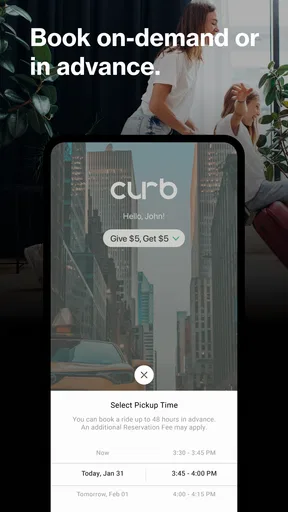
Planning ahead is a different use case. If I have an early train or a meeting across town, arranging a ride in advance can help me build transport into the morning instead of leaving the whole decision until I am heading out. My practical tip is to make the booking while I am calm, then check the pickup location and timing carefully. A scheduled ride reduces last-minute effort, but it is still sensible to have a backup plan for a journey where lateness would matter.
Heavy-use moments: airport runs, errands, and shared trips
For airport travel, the value is mostly in reducing small sources of stress: deciding how to get a taxi, finding the pickup spot, and dealing with payment at the end. I would use the advance-booking option when it suits the trip, but I would not assume that booking alone removes the need to allow for traffic, pickup confusion, or other delays. If I were travelling with luggage, I would also make sure everyone in the group is ready before requesting a ride, so the pickup does not turn into a rushed search for bags or companions.
A short everyday errand can be a better test of whether this kind of app belongs on my phone. Say I am leaving a medical appointment in an unfamiliar part of town and want to get home without walking to a main road to hail a cab. A phone-based request and in-app payment can make that trip simpler, particularly if I do not want to handle a card or cash during the ride. For a very short journey in a place where taxis pass constantly, however, hailing one may be quicker than opening an app and arranging a pickup.
Worth Reading Before You Choose

EA SPORTS FC Mobile 26 Is a Bigger Football Game, but It Takes Time

Flipboard Shows What News Apps Must Do Beyond the Feed

Switching to Android Auto Means Rethinking Your Driving Routine

Google Calendar Makes a Crowded Week Easier to Manage

Ludo King Makes the Most of the Minutes Between Plans

Baby Panda World Brings Quick Play to Modern Phones, but Its Game Library Feels Busy
When several people are travelling together, a shared fare can make the end of a trip less awkward than collecting separate payments by hand. I would agree on how to divide the cost before setting off, rather than trying to settle everyone’s share while getting out. That small bit of coordination matters: a convenient payment feature helps, but it cannot decide what feels fair for a group with different start or end points.
Reliability is partly about the pickup
Maps can make a pickup feel clear, but busy streets, large buildings, and restricted stopping areas can still complicate the handoff. I would choose a safe, obvious place where a taxi can stop, and make sure I can see the street name or a recognizable landmark. That is especially useful outside stations, event venues, and office blocks, where a pin may be close to the right place but not necessarily on the side of the road where I am waiting.
It is also worth thinking about what to do if the ride does not come together as expected. Keep enough time to try another transport option, and avoid assuming that a screen showing a request means the whole trip is settled. If I am travelling somewhere unfamiliar, I would identify a nearby main road or taxi rank before I need it. This is not a criticism unique to Curb; it is a sensible habit with any app-mediated pickup.
Device demands and practical constraints
Curb is rated for Everyone and is listed for devices running version 9 or later of its supported operating system. Its current version is 7.1.1. For a navigation app, I would pay more attention to whether my phone has a working connection and enough battery than to raw device power. A phone that is nearly out of charge can make even a simple pickup harder to manage, so I would start a longer day with the battery topped up or carry a charger.
I would also avoid doing all the planning while standing in a hurried crowd. Check the pickup point before walking away from a familiar landmark, and keep the app ready when the taxi is expected. Those habits are more useful than assuming the phone will solve every last-minute problem. If the app feels slow to respond, pausing to confirm the connection and location is a better first step than repeatedly tapping through the request flow.
Getting Started with Curb
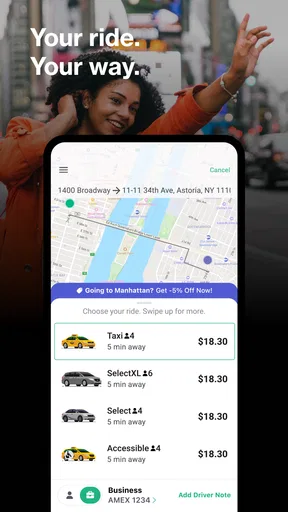
First off, setting up Curb is as easy as pie. I downloaded it from the app store, and within minutes, I was ready to roll. The interface is super clean, which is a blessing because who wants to deal with a cluttered app when you’re in a rush? After a quick sign-up, you’re greeted with a map that shows available taxis around you. It’s like Uber, but with the familiar yellow cabs we all know and love.
Features That Stand Out
One of the coolest features is the ability to schedule rides. If you’re like me and despise the morning rush, this is a lifesaver. You can set your pick-up time in advance, and a taxi will be there right on the dot. I tested it for an early morning meeting, and it was flawless.
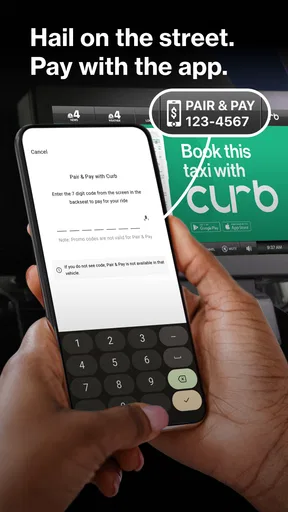
Another neat feature is the in-app payment system. No more fumbling with cash or cards; you can pay directly through the app. Plus, you can link your preferred payment method, which adds a layer of convenience. I particularly loved how seamless the whole payment process was, leaving me with more time to enjoy my ride.
Ride Experience
So, how’s the ride itself? Pretty smooth! I took several trips using Curb, and each time, the taxis arrived promptly. The drivers were courteous and knew the city like the back of their hands. What’s more, the app allows you to rate your ride and driver, ensuring quality service is maintained. It’s reassuring to know that there’s accountability on both ends.
Battle of the Apps
Now, you might wonder how Curb stacks up against other ride-hailing services. In cities where traditional taxis are still a go-to, this app shines. It bridges the gap between traditional taxi services and modern ride-hailing apps. While it might not replace your favorite rideshare app entirely, it’s a fantastic backup, especially during peak times when other services might be scarce.
The main trade-off is that a taxi-focused service is not automatically the best choice for every trip. If I need to compare several types of rides or am travelling somewhere with limited taxi availability, I would check the alternatives I already use as well. On the other hand, someone who prefers licensed local taxis may find the familiar vehicle and taxi-based experience more appealing than a service built around rideshare cars. I would treat Curb as an option to compare, not as a reason to uninstall every other transport app.
User Tips and Tricks
Here are a few tips to get the most out of your Curb experience:
- Plan Ahead: Use the scheduling feature for peace of mind, especially if you have a flight to catch.
- Check for Promotions: Curb often has promotions and discounts, so keep an eye out for those.
- Explore Payment Options: Link different cards to see which offers the best cashback or rewards.
The app also offers a split fare feature, which is a godsend when you’re traveling with friends. No more awkward math at the end of the ride!
Who should use it, and who may prefer something else
I would recommend trying Curb if taxis are a regular part of your travel routine, you like having a way to arrange one by phone, or you want a taxi-oriented backup for a busy day. It makes most sense for someone who already knows where taxis are useful in their city and can plan around pickup time. The option to pay through the app is particularly handy when I want to finish a ride without searching through a bag for a wallet.
I would be more cautious if I rarely take taxis, travel mostly in places where they are hard to find, or need a guaranteed arrival time for a critical connection. In those cases, a local taxi rank, another transport service, or a plan that leaves more margin may be better. I would also avoid choosing it solely because an app shows nearby vehicles; the actual convenience depends on the pickup, the timing, and whether the taxi can reach me.
Final Thoughts
All in all, Curb - Request & Pay for Taxis is a solid app for anyone who still loves the charm of a good old taxi ride, but with modern-day convenience. It’s a handy tool that complements existing rideshare services and gives users more flexibility in their transport choices. If you find yourself in a bustling city and want a reliable ride, give Curb a go. It’s like having the best of both worlds right at your fingertips!
My overall view is that Curb is most useful as a practical taxi option, not a promise that every trip will be faster or smoother than the alternatives. Its best moments are the ones where arranging and paying for a taxi on a phone removes a hassle I would otherwise face. The app has been available since March 13, 2010, which gives it a long history in this category, but I would still judge it by how well it fits the routes I actually take.
If I were deciding whether to keep it, I would try it on a low-pressure local trip first, check how the pickup works in my area, and see whether the payment flow suits me. That gives a much more useful answer than relying on a rating alone. For a taxi-friendly city and a traveller who values a familiar cab with app-based convenience, it is worth a look; for someone who needs universal coverage or certainty above all else, keeping another transport option ready is the sensible choice.
Pros
- User-friendly interface for easy navigation.
- Supports cashless payments via app.
- Access to professional
- licensed drivers.
- Real-time tracking for safety and convenience.
- Wide coverage in major cities.
Cons
- Limited availability in smaller towns.
- Occasional delays during peak hours.
- Higher fares compared to some ride-shares.
- App may crash on older devices.
- Customer support can be slow to respond.
FAQs for Curb - Request & Pay for Taxis
What is Curb and how does it work?
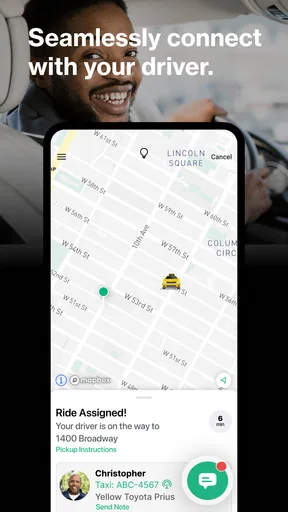
Curb is a mobile app that connects users with professional taxi drivers in their area. It allows you to request a ride, track its arrival in real-time, and pay for the trip seamlessly through the app. With features like fare estimates and driver ratings, Curb aims to provide a reliable and convenient taxi experience.
Is Curb available in my city?
Curb operates in many major cities across the United States, including New York City, Chicago, and Los Angeles. To check if Curb is available in your area, you can visit their website or download the app, which will automatically determine your location and show available services.
How do I pay for rides using Curb?
Curb allows you to pay for taxi rides directly through the app using a credit card or PayPal. You can also choose to pay with cash if preferred. The app provides an option to add a tip and offers digital receipts for your convenience, ensuring a smooth payment process.
Are Curb drivers professional and licensed?
Yes, all drivers available through Curb are professional, licensed taxi drivers. The app partners with licensed taxi companies to ensure that riders receive safe and reliable service. Drivers undergo thorough background checks and adhere to local regulations, providing peace of mind for users.
What safety features does Curb offer?
Curb prioritizes rider safety with features like real-time ride tracking, driver ratings, and an option to share trip details with friends or family. The app also includes a support feature that allows users to easily contact customer service for any assistance or to report issues during their ride.


